Manufacturing software is the set of systems a plant uses to take an order, plan materials and capacity, run the floor, check quality, maintain machines, move and ship product, and record what it cost. There are twelve categories, and each one owns a single kind of record: ERP, MRP, APS, CRM, supplier management, MES, QMS, CMMS, WMS, PLM, CAD and CAM, and SCADA with the PLCs and historian beneath it. Most plants own several and connect few: in Rockwell Automation’s July 2026 survey of 1,560 manufacturing decision makers, 93% have an MES but only 23% report full integration with their ERP and other systems.
In this guide
What does “manufacturing software” mean?
Where does each system sit? The stack, using ISA-95
What are the 12 types of manufacturing software?
How do the systems hand work to each other? One order, start to finish
What are the five types of software used in manufacturing?
What software is used in manufacturing?
Which manufacturing software should you buy first?
Which software is best for manufacturing?
What are the top 3 ERP systems?
What happens when the plan changes, and where does Morsa fit?
Glossary, FAQ, Sources, Changelog, Related pages
What does “manufacturing software” mean?
Manufacturing software means the systems that run a plant from the order to the invoice, and the phrase covers a dozen different products because every vendor uses it to mean the one they sell. That is why a search for it returns a CRM listicle next to an ERP blog. The center of gravity is the ERP, which holds orders, inventory, bills of materials, and money. Around it sit the systems that plan, execute, inspect, maintain, move, and control. They were bought at different times, by different departments, from different vendors, and they were never designed together. This guide bundles them into twelve categories by the record each owns, which is why SCADA, the PLCs, and the historian share one entry: together they own the machine’s state.
This guide is written for the plants that make up most of US manufacturing. NIST reports that “small and medium-sized manufacturers make up 98% of the U.S. manufacturing base” (NIST, July 2026). Census data restated by the National Association of Manufacturers puts it more sharply: of 239,265 US manufacturing firms in 2022, all but 4,177 had fewer than 500 employees, and 93.1% had fewer than 100 (NAM). Those plants are still buying. Deloitte’s 2026 Manufacturing Industry Outlook reports a 2025 survey of 600 manufacturing executives in which 80% “plan to invest 20% or more of their improvement budgets in smart manufacturing initiatives” (Deloitte, November 2025), and in NAM’s third-quarter 2026 survey of 220 manufacturers, 61.0% said they will place significant or moderate emphasis on digital transformation of their operations in the next 12 months (NAM, September 2026). If you run a plant of 50 to 1,000 people with an ERP already in place, this is your map. The wider practice it belongs to is explained in smart manufacturing.
98%
of the US manufacturing base is small and medium-sized manufacturers.
NIST, July 2026
80.8%
of manufacturers name increased raw material costs as their top business challenge.
NAM Outlook Survey, Q3 2026
80%
of 600 executives surveyed in 2025 plan to put 20% or more of improvement budgets into smart manufacturing.
Deloitte 2026 Manufacturing Outlook
>25%
of organizations exceeded their ERP project budget. The leading cause was additional technology needs.
Panorama 2026 ERP Report
Sources are linked in the guide. Percentages are the publishers’ own; Panorama reports “more than a quarter”.
Where does each system sit? The stack, using ISA-95
Each system sits at one of the levels ISA-95 defines, and the level tells you which clock it runs on. ISA-95, also published as IEC 62264, is “an international set of standards aimed at integrating logistics systems with manufacturing control systems.” It describes a plant as levels. Level 4 “describes all the activities related to running a business,” including ERP. Level 3 “describes manufacturing execution systems (MES) and other systems such as supervisory control and data acquisition (SCADA) that manage manufacturing operations.” Level 2 covers “programmable logic controllers (PLCs), distributed control systems (DCSs) and other control devices” (ISA). Siemens summarizes the same ladder as Level 1 intelligent devices, Level 2 control systems, Level 3 manufacturing operations systems such as MES, and Level 4 business logistics systems such as ERP (Siemens).
COORDINATION LAYER
Where the plan meets reality
Reads the business and operations systems and the threads where the plant talks. Owns the gap between records when they disagree. Morsa, the AI that operates the factory for you, sits here.
LEVEL 4
Business
ERP: orders, inventory, BOMs, money. MRP: what to buy and make, and when. APS: the sequence on each machine. CRM: quotes and promises. Supplier mgmt: POs and scorecards.
Days to weeks
ISA-95 INTERFACE
WHERE INFORMATION IS LOST
LEVEL 3
Operations
MES: work orders in progress. QMS: inspections, holds, CAPA. CMMS / EAM: maintenance work, spares. WMS: receipts, picks, shipments. Historian: machine data, logged.
Shifts to hours
LEVELS 0 TO 2
Control
PLC: runs the machine. SCADA / HMI: screens, alarms, setpoints.
Seconds
FEEDS IN FROM THE SIDE
Engineering
PLM: designs, revisions, the eBOM. CAD: the model and drawing. CAM: tool paths for the machines.
Product lifecycle
Levels per ISA-95 (IEC 62264) and Siemens. Vendor names in the guide are examples, not endorsements.
Two things matter about this picture for a buyer. First, the levels are about time. Level 4 thinks in days and weeks: orders, purchase orders, month-end. Level 3 thinks in shifts and hours: this work order on this machine now. Level 2 thinks in seconds. A system built for one clock does a poor job at another, which is why an ERP is a bad scheduler and an MES is a bad ledger. Second, ISA-95 “primarily deals with the interface between levels 3 and 4” (ISA). The standard exists because the seam between the business system and the floor system is where plants lose information.
One note on placement. ISA’s own summary groups SCADA with Level 3. This guide draws SCADA and the HMI with the control layer because they talk to the PLCs in seconds, and it keeps the historian at Level 3 because it serves the operations systems above it. Vendors draw the line in different places; what matters is the clock each system runs on.
Level 4, business
What lives there: ERP, MRP, APS, CRM, supplier management
The record it owns: Orders, inventory, BOMs, purchase orders, costs, the master schedule
Clock: Days to weeks
Examples: Microsoft Dynamics 365 Business Central, SAP Business One, NetSuite, Epicor Kinetic, Infor CloudSuite Industrial, Odoo
Level 3, operations
What lives there: MES, QMS, CMMS and EAM, WMS, historian
The record it owns: Work orders in progress, inspections, maintenance work, warehouse moves, the time-series log of machine data
Clock: Shifts to hours
Examples: Siemens Opcenter, Rockwell Plex, Tulip, MasterControl, eMaint, Limble, MaintainX, AVEVA PI
Levels 0 to 2, control
What lives there: PLCs, SCADA, HMI
The record it owns: Machine states, sensor readings, alarms, setpoints
Clock: Seconds
Examples: Ignition, AVEVA, Rockwell FactoryTalk
Engineering, feeds in from the side
What lives there: PLM, CAD, CAM
The record it owns: Designs, engineering BOMs, revisions, tool paths
Clock: Product lifecycle
Examples: PTC Windchill, Siemens Teamcenter, SolidWorks, Autodesk Fusion, Mastercam
What are the 12 types of manufacturing software?
The twelve types are ERP, MRP, APS, CRM and quoting, supplier management, MES, QMS, CMMS and EAM, WMS, PLM, CAD and CAM, and SCADA with PLCs and the historian. Each entry below answers four questions: what it is, what record it owns, what it does not do, and who needs it. Vendor names are examples, not endorsements.
Business systems (Level 4)
1. ERP: enterprise resource planning
IBM defines ERP as “a business management software system that is designed to manage and streamline an organization’s functions, processes and workflows with automation and integration” (IBM). In a plant, the ERP is the system of record for customer orders, inventory quantities and values, bills of materials, routings, purchase orders, and costs. A manufacturing ERP adds production orders, work centers, and capacity. Microsoft’s description of Business Central is a good template for what “manufacturing” means in a mid-market ERP: “Use production BOMs to define components, routings to define operations, and work and machine centers to model capacity and costs. Production orders coordinate material consumption, operation time, output, and finished goods from planned demand through completion” (Microsoft Learn, updated July 2026).
What it does not do: it does not know what is happening on the floor right now, and it does not decide what to do when the plan slips. It records what people tell it, when they tell it. Gartner predicts that “by 2027, more than 70% of recently implemented ERP initiatives will fail to fully meet their original business case goals” (Gartner; host bot-blocked, wording confirmed from an Internet Archive capture of 7 September 2026).
Who needs it: every plant. If orders, inventory, and money live in spreadsheets or a home-grown system, ERP is the first purchase. The vendor shortlist, with honest pros and cons, is at manufacturing ERP software.
2. MRP: material requirements planning
MRP answers one question: given what we have promised, what do we need to buy or make, and by when? SAP’s Business One documentation puts it plainly: “MRP calculates gross requirements for the highest Bill of Materials (BOM) level based on sales orders, production orders, forecasts, and other inputs” and then “calculates gross requirements at the lowest BOM level by carrying down net-parent-demands through the BOM structure” (SAP, August 2024). In most modern ERPs it is a module, not a separate product. Business Central runs “the master production schedule (MPS), material requirements planning (MRP), or both to suggest purchase, transfer, assembly, and production orders” from one planning worksheet (Microsoft Learn, updated September 2026).
Standalone MRP products such as MRPeasy, Katana, and Fishbowl serve plants that need planning and inventory but not a full ERP. Among 1,848 buyers of MRP software that Capterra analyzed in 2025, “23% rely on spreadsheets for planning,” and “37% switch because planning inefficiency starts slowing execution” (Capterra, April 2026).
What it does not do: MRP plans against the lead times and capacity in the master data. When a supplier date moves, it does notice: the next run produces exception messages telling the planner to expedite, delay, or cancel. The failure is volume. A busy plant generates hundreds of those messages, nobody can triage them all, and the ones that matter are buried with the ones that do not.
Who needs it: any plant that buys components against a schedule. Planning and scheduling tools, including the spreadsheet most plants still use, are covered in production planning software.
3. APS: advanced planning and scheduling
APS takes the orders MRP released and sequences them across machines, people, and tooling with real constraints: setup times, shift calendars, which press can run which mold. MRP plans materials as if capacity were infinite. APS plans capacity against the materials the system says will be there, which is only as good as the promised dates behind it. Vendors include PlanetTogether and Siemens Opcenter APS, and several manufacturing ERPs bundle a scheduler. IoT Analytics estimates that 54% of plants globally still managed manufacturing operations with pen, paper or spreadsheets in 2024 (IoT Analytics, December 2025), and the scheduler is the file that survives longest.
What it does not do: a schedule is a plan, and the plan is right until the first phone call. APS does not chase the supplier or tell the shift lead the job cannot run.
Who needs it: plants with many jobs competing for the same machines, especially high-mix, low-volume shops where the sequence changes daily.
4. CRM and quoting
Customer relationship management holds the pipeline, the contacts, and the quotes. Configure-price-quote (CPQ) tools sit next to it for engineer-to-order products. HubSpot, Salesforce, and Dynamics 365 Sales are common. CRM is here because the handoff from a quote to a sales order in the ERP is one of the first places a promise gets lost.
Who needs it: plants with a sales team that quotes. Many plants of 50 to 300 people run this inside the ERP instead.
5. Supplier and supply chain management
Supplier management software holds supplier records, scorecards, on-time and quality performance, and the purchase order conversation. Larger plants run procurement suites such as SAP Ariba; most mid-size plants run purchasing in the ERP and the supplier conversation in email. That matters because supplier delays are the most common way a plan breaks. In NAM’s third-quarter 2026 survey of 220 manufacturers, 80.8% cited increased raw material costs as a top business challenge, 62.4% cited trade uncertainties and 44.6% cited supply chain challenges; among medium-sized manufacturers of 50 to 499 employees, 84.8% named raw material costs first (NAM, September 2026). The Institute for Supply Management’s Supplier Deliveries Index registered 59.3% in August 2026, “slowing performance for the ninth month in a row” (ISM via PR Newswire, September 2026). Scorecards, risk, and the supplier conversation are covered in supplier management software.
Operations systems (Level 3)
6. MES: manufacturing execution system
SAP’s definition: an MES “monitors, tracks, documents, and controls the process of manufacturing goods” from raw materials to finished products, and provides “a functional layer between enterprise resource planning (ERP) and process control systems” (SAP; host blocks automated fetches, wording confirmed from an Internet Archive capture of May 2026). The MES takes production orders from the ERP, dispatches them to work centers, collects what was made and scrapped, tracks operator and machine time, and gives the floor its work instructions and traceability. Siemens Opcenter, Rockwell Plex and FactoryTalk, and Tulip are examples; regulated plants often run MasterControl.
Two 2026 facts to know. MESA International, whose model defined MES functions for three decades, “voted to cease operations effective 30 June 2026,” and its content moved to ISA (ISA, 2026). And the market is both wide and thin: IoT Analytics counts more than 300 MES vendors in a market worth $5.5 billion in 2024, yet estimates “just 8% of plants use a commercial MES today” (IoT Analytics, December 2025). Among larger manufacturers the picture inverts: Rockwell’s July 2026 survey found 93% have an MES, 28% enterprise-wide, and 23% fully integrated (Rockwell Automation, July 2026; vendor research, and 58% of its respondents work at organizations over $1 billion in revenue).
What it does not do: MES executes the plan it was given. It does not resolve the shortage or the broken tool; it records that the job stopped.
Who needs it: plants where you cannot see work in progress, where traceability is a customer or regulatory requirement, or where paper travelers cause errors. Read what an MES system is, the MES vs ERP comparison, and the MES software vendor guide before you buy one.
7. QMS: quality management system
QMS software holds inspection plans, results, nonconformances, corrective actions (CAPA), supplier quality, document control, and audit records. For most plants it supports ISO 9001; for medical devices, the FDA’s Quality Management System Regulation “became effective on February 2, 2026” and “incorporates by reference the international standard, ISO 13485:2016” (FDA). Products include MasterControl, ETQ, and Intellect, and most manufacturing ERPs and MESs ship a quality module.
Who needs it: any plant where a customer audit, a regulatory audit, or a recurring defect costs real money, and the records are on paper or in a shared drive.
8. CMMS and EAM: maintenance and asset management
IBM defines a CMMS as “a software solution that helps organizations automate and enhance their core maintenance operations, document activity and improve workflows,” and lists six core features: work order management, preventive maintenance scheduling, predictive maintenance scheduling, MRO inventory and spare parts management, mobile accessibility, and reporting and KPI dashboards (IBM, updated August 2026). The difference from EAM is scope: “While CMMS software is focused on maintenance activities for operational assets, EAM systems help manage assets throughout their entire lifecycle, from acquisition and installation through operation, maintenance and retirement.” Mid-size plants typically run a CMMS such as eMaint, Limble, MaintainX, UpKeep, or Fiix; EAM suites such as IBM Maximo suit multi-site asset owners (IBM).
Who needs it: any plant where breakdowns are unplanned, spares are missing when needed, or preventive maintenance lives on a whiteboard. If your question is about predicting failures rather than managing work orders, see predictive maintenance software.
9. WMS: warehouse management system
A WMS directs receiving, put-away, picking, packing, and shipping by location, bin, and lot. Microsoft’s Business Central documentation frames the two basics well: businesses that move goods need “an overview of inventory levels and item placement in the warehouse” and the ability to “quickly and accurately receive, pick, and ship items” (Microsoft Learn, updated June 2026). Most manufacturing ERPs include basic warehousing, though bin, location, and lot control are often a paid add-on. A standalone WMS is a step up for plants with many locations, lot control, or a distribution operation.
Who needs it: plants where the ERP says the part is in stock and the picker cannot find it. That single symptom stops more jobs than most buyers expect, because the ERP still shows the material as available.
Engineering systems
10. PLM: product lifecycle management
PLM holds the product definition: CAD files, revisions, engineering change orders, and the engineering bill of materials. PTC notes that PLM “originally provided basic safeguards for CAD files,” meaning check-in, check-out and version control, and has since grown to manage “an ecosystem of information,” including “digitally generating bills of material (BOMs) and related product views (e.g., mBOMs and sBOMs)” (PTC; host blocks automated fetches, wording confirmed from an Internet Archive capture). PTC Windchill, Siemens Teamcenter, Dassault 3DEXPERIENCE, and Arena are examples.
Who needs it: plants that design what they build, especially where an engineering change reaches the floor after the parts are already cut.
11. CAD and CAM
Computer-aided design produces the model and drawing; computer-aided manufacturing turns the model into machine instructions such as tool paths for CNC equipment. SolidWorks, Autodesk Inventor and Fusion, and Siemens NX cover design; Mastercam and the CAM modules inside those suites cover programming. They are engineering tools rather than operations tools, but the manufacturing BOM in the ERP starts life here.
Control systems (Levels 0 to 2)
12. SCADA, PLCs, and the historian
At the bottom of the stack, PLCs run the machines. SCADA, in NIST’s definition, is “a generic name for a computerized system that is capable of gathering and processing data and applying operational controls over long distances” (NIST). It gives operators screens (HMIs), alarms, and setpoints. The historian is “a centralized database supporting data analysis using statistical process control techniques” (NIST): the time-series log of every sensor and machine state, which is where OEE and downtime analysis start. Ignition, AVEVA, and Rockwell FactoryTalk are common SCADA platforms; AVEVA PI and the historians built into SCADA suites store the data.
Who needs it: any plant with automated equipment already has PLCs. SCADA and a historian become a buying decision when you want machine data in the MES or in a dashboard without an operator typing it. Rockwell’s 2026 report finds that of the data manufacturers already collect, only 43% is used effectively (Rockwell Automation, May 2026).
How do the systems hand work to each other? One order, start to finish
One customer order passes through all twelve systems in seven handoffs, and three of those handoffs are where the plan most often breaks. No page on the web draws this, so here it is, for a discrete plant that runs everything. The order in which a plant connects these systems is in the digital transformation roadmap.
01 / CRM
Quote
Sales quotes. The customer says yes.
02 / ERP
Sales order
The promised date is now a record.
03 / MRP
Requirements
Explodes the BOM. Releases POs and production orders.
04 / APS
Schedule
Or the planner’s spreadsheet. Times against jobs.
05 / MES
Dispatch
Work orders reach a work center and a person.
Handoff that breaks most often: supplier confirms Tuesday, ships Friday. Tool out for repair, planning not told. ERP, the system of record.
ONE ORDER, CONTINUED
The same order, continued from step 05.
06 / PLC / SCADA
Run
The cycle runs. Counts and downtime flow back up.
07 / QMS
Inspect
Pass, or a nonconformance and a hold.
08 / WMS
Ship
Pick, pack, ship. The customer gets a tracking number.
09 / ERP
Invoice
Shipment posted, inventory relieved. The money.
Handoff that breaks most often: lot on hold, truck booked for 3 p.m. No system owns the moment two records disagree. A person does.
Quote to order. Sales quotes in the CRM. When the customer says yes, the sales order is entered in the ERP. Handoff one: the promised date is now a record.
Order to requirements. MRP explodes the order through the BOM and compares it with stock, open purchase orders, and lead times. It releases purchase orders for what is short and production orders for what must be made. Handoff two: a promise to a customer becomes promises from suppliers.
Requirements to schedule. APS, or the planner’s spreadsheet, sequences the production orders across machines and shifts. Handoff three: the plan now has times against it.
Schedule to floor. The MES receives the production orders, dispatches them to work centers, and shows the operator the work instructions. Handoff four: the plan reaches a person.
Floor to machine. The PLC runs the cycle; SCADA shows it and alarms; the historian logs it. Counts and downtime flow back up to the MES.
Machine to quality. In-process and final inspections are recorded in the QMS. A failure raises a nonconformance and a hold. Handoff five: the product either moves on or it does not.
Quality to shipment. The WMS picks, packs, and ships against the sales order. Handoff six: the customer gets a tracking number.
Shipment to invoice. The ERP posts the shipment, invoices, and relieves inventory. Handoff seven: the money.
Now read it the way the floor experiences it. Handoff two breaks when a supplier confirms Tuesday and ships Friday. Handoff four breaks when the tool for the second operation is out for repair and nobody told planning. Handoff six breaks when a lot is held for inspection and the truck was booked for 3 p.m. Every system in the chain did its job. The record it owns is correct. What no system owns is the gap between the records, and that gap is closed by people: a planner rebuilding the schedule, a purchaser on the phone, a supervisor in a group chat.
That is not a small share of the work. Deloitte’s 2026 Manufacturing Industry Outlook expects “more than 81% of task hours in manufacturing” to remain human-driven (Deloitte, November 2025). Jessica Covington, VP of Operations at Machine Specialties Inc., an aerospace and defense machine shop, described the handoff four problem to Modern Machine Shop: “Paper travelers are only as up-to-date as the day they’re printed” (Modern Machine Shop, March 2025).
Every system in the stack owns one record and keeps it correct. None of them owns the moment when two records disagree. That moment is a person’s job, and it usually starts with a phone call.
What are the five types of software used in manufacturing?
The five types most often listed are ERP, MES, MRP, QMS, and WMS. Some lists swap in supply chain management or CRM, and one widely shared answer leaves out ERP entirely. There is no standard “five.” The twelve categories above are the full set; if you have to pick five for a plant of 50 to 1,000 people, pick ERP with MRP inside it, a scheduler, MES, QMS, and CMMS, because those are the ones that touch every shift.
What software is used in manufacturing?
Most plants run an ERP, a planning tool, some form of shop-floor execution, a quality system, a maintenance system, and the PLCs and SCADA that run the machines. The planning tool is often a module of the ERP or a spreadsheet, and shop-floor execution ranges from paper travelers to a full MES. Larger plants add PLM, a warehouse system, and a historian. The table below tells you which to buy next.
Which manufacturing software should you buy first?
Buy for the bottleneck, not for the acronym. The most expensive mistake in this category is buying a suite when one function done well would have fixed the problem. Panorama Consulting’s 2026 ERP Report, 170 organizations with a median project timeline of nine months, found that “more than a quarter of organizations reported that their project was over budget,” and that among them “the most common reason was the unexpected need for additional technology” (Panorama, 2026). Chris Devault, Senior Manager of Client Services at Panorama, explains the mechanism: “Organizations often discover fatal misfits late in the project, so they turn to additional technology, scope expansion, and custom builds” (Panorama, March 2026). For plants of 150 people and up, see enterprise manufacturing software for mid-market and enterprise manufacturers.
If this is your daily pain | Buy this first | Not this |
|---|---|---|
Orders, inventory, and costs live in spreadsheets or a home-grown system | ERP with an MRP module | A standalone MES on top of spreadsheets |
The planner rebuilds the schedule by hand every morning | A scheduler: an APS or the ERP’s scheduling module | A bigger ERP |
You cannot see what is in progress or which machine is on which job | MES, or machine monitoring as a first step | Another dashboard on ERP data |
Quality records are paper, and audits take a week to prepare | QMS, or the quality module of your ERP or MES | A document management tool |
Breakdowns are unplanned and spares are missing | CMMS | Predictive maintenance sensors before the work orders exist |
The ERP says it is in stock and the picker cannot find it | Cycle counting discipline, then WMS | Buying more safety stock |
Engineering changes reach the floor after the parts are cut | PLM, or ERP engineering change control | Emailing PDFs faster |
The plan changes daily and people chase each other in chats | A system that catches the change, works out which jobs it hits, and drives the response through the people who fix it | Replacing the ERP |
The pain most lists miss is flow. In the practitioner threads, the complaint under all of the others is production flow: lead times grow, queues form in front of the same two machines, and nobody can say what to run next. That is rarely an ERP problem. It is a scheduling problem, a data problem (the MES does not know the job stopped), or a coordination problem (the person who could fix it was not told). Match the symptom to the row above before you match it to a vendor.
By size and production mode. This is guidance from the plants and threads behind this guide, not a rule. A make-to-stock plant with 50 to 150 people usually needs ERP with MRP, a CMMS, and a quality module before anything else. A make-to-order or job shop of the same size feels scheduling pain first and often benefits from an APS or a job-shop ERP with strong scheduling before it needs an MES. Engineer-to-order plants add PLM early because the BOM changes while the job is running. Plants above 300 people, multiple lines, or OEM customers with delivery penalties are the ones that get real value from a full MES and a standalone WMS. Choose the manufacturing mode first, then the system; the same ERP can be the right answer for a furniture plant and the wrong one for a machined-parts shop.
Make-to-stock
Standard products, built to a forecast
50 to 150 people: ERP with MRP, a CMMS, and a quality module
150 to 300 people: A scheduler; a WMS once locations and lots multiply
300 to 1,000 people: A full MES, a standalone WMS, and a QMS
Make-to-order and job shop
Many jobs, the sequence changes daily
50 to 150 people: A job-shop ERP with strong scheduling, or an APS
150 to 300 people: APS, machine monitoring, and a CMMS
300 to 1,000 people: MES with APS, then QMS and WMS
Engineer-to-order
The BOM changes while the job runs
50 to 150 people: ERP with engineering change control, and PLM early
150 to 300 people: PLM, APS, and a CMMS
300 to 1,000 people: PLM tied to the MES, then QMS
Any mode, when the plan changes daily
A system that catches the change, works out which jobs it hits, and drives the response through the people who fix it. Not a new ERP.
Guidance from the plants and threads behind this guide, not a rule. Choose the production mode first, then the system.
Map the process before you sign. Gutchess Lumber, a New York hardwood producer with more than 500 employee-owners, replaced its company-wide ERP with help from a NIST Manufacturing Extension Partnership center, which ran a value stream mapping exercise before any vendor was chosen and coached the project through implementation. Justin St. John, its Director of Information Technology: “Gutchess Lumber successfully implemented a brand-new, company-wide ERP system with minimal disruption to production and our customers” (NIST MEP, January 2026).
What it costs. No public benchmark with a stated sample was found for what manufacturing software costs a plant of this size; the analyst figures that circulate are gated, undated, or averaged across companies far larger than yours. Three lines are underestimated in almost every budget: implementation and data cleanup, which usually exceeds the first-year license; integration between the systems, which nobody prices until the second system arrives; and per-seat fees once the floor, not only the office, needs access. Ask every vendor for all three over three years. The suites that bundle several of these functions, fourteen compared with the prices they publish, are in manufacturing management software.
Eight questions to ask every vendor, in any category
Which record does your system own, and which system owns the record it depends on?
What happens in your system when a supplier date slips? Show me, do not tell me.
How does data get in: operator entry, barcode, PLC, API, or file import? Name the ones that are live in a plant like ours.
What does a user who is not a computer person see on a phone at 6 a.m.? Covington’s rule: “I don’t want my people to have to walk across a shop to input something into an ERP.”
What is the total cost for three years, including implementation, integration, and per-seat fees?
Which of your customers is our size and our production mode? Can we call them?
What did the last implementation that ran over budget run over on?
What will we still be doing in Excel after go-live?
Which software is best for manufacturing?
There is no best manufacturing software, only the right system for a specific plant at a specific stage. A plant with 60 people making to stock and a plant with 600 people building to order for an OEM need different ERPs and different schedulers, and the first may need no MES at all. Find the bottleneck in the table above, then shortlist vendors that serve your size and mode. For the ERP shortlist, with what each vendor does well and where each falls short, see manufacturing ERP software. For broader plant-management suites, see manufacturing management software. For one pick per job with prices, see the best manufacturing software for 2026.
What are the top 3 ERP systems?
The answer most pages give is SAP, Oracle, and Microsoft Dynamics 365, which are the three largest ERP vendors by name recognition. For a plant of 50 to 1,000 people the shortlist is different and more useful: Microsoft Dynamics 365 Business Central, SAP Business One, NetSuite, Epicor Kinetic, Infor CloudSuite Industrial, Acumatica, and Odoo are the names that come up most, with Plex for plants that want ERP and MES from one vendor. Two of those, Business Central and SAP Business One, are among the systems Morsa reads today.
What happens when the plan changes, and where does Morsa fit?
When the plan changes, every system on this page keeps its own record correct and none of them owns the response. The order is in the ERP. The schedule is in the APS. The job is in the MES. The inspection is in the QMS. What happens when the supplier ships short, the tool breaks, and the customer moves the date, all on the same Tuesday? The records are still each correct. The plant is late. Someone has to notice, work out which orders are hit, decide what to do, tell four people, and check that it happened.
Morsa, the AI that operates the factory for you, does that job. It reads the plant’s systems and the threads where people talk, catches the change, works out which jobs and customers it hits, decides the response within the plant’s rules, gets it done through the people who fix it, and checks that it happened. It does not replace any system above. It sits over them.
What it reads. The ERP, MES, CMMS, QMS, and WMS, and the threads where the plant actually talks, in WhatsApp, Microsoft Teams, email, SMS, or whatever your plant runs on. Systems shown on morsa.ai today include SAP Business One, SAP Ariba, Microsoft Dynamics 365 Business Central, Odoo, Zoho, QuickBooks, Excel, Google Sheets, Gmail, and Outlook. Those are examples, not the list. Any platform with an API, a database, a file export, a message stream, or an email trail can be connected, machines, PLCs, SCADA systems, and sensors included.
What it works out. For every change, which part, work order, machine, customer, and owner it belongs to, and what it affects downstream: which jobs slip, which commitment is at risk, by when.
What it decides. The next action, within rules the plant approved: expedite, resequence, substitute, escalate, or ask a named person. Anything outside the rules becomes a question to a human, not an action.
What it does. Carries the response out across systems and people: updates the record, creates and assigns the job, messages the owner in the channel they already use, chases before the date, and escalates up the reporting line when work goes quiet.
What the user sees. A supervisor sees the chase happen in the group chat they already use. A plant manager sees open commitments, who owns them, and which ones are slipping, without reconstructing yesterday. Nothing new to roll out. Production Head Anil Kohli at J4S: “Our people don’t have to learn any new software. People just message the way they always have. Morsa coordinates all the messages in the background.”
What it verifies. Jobs close on proof, not on a “done” message: a photo, a document, a system entry, a confirmed receipt.
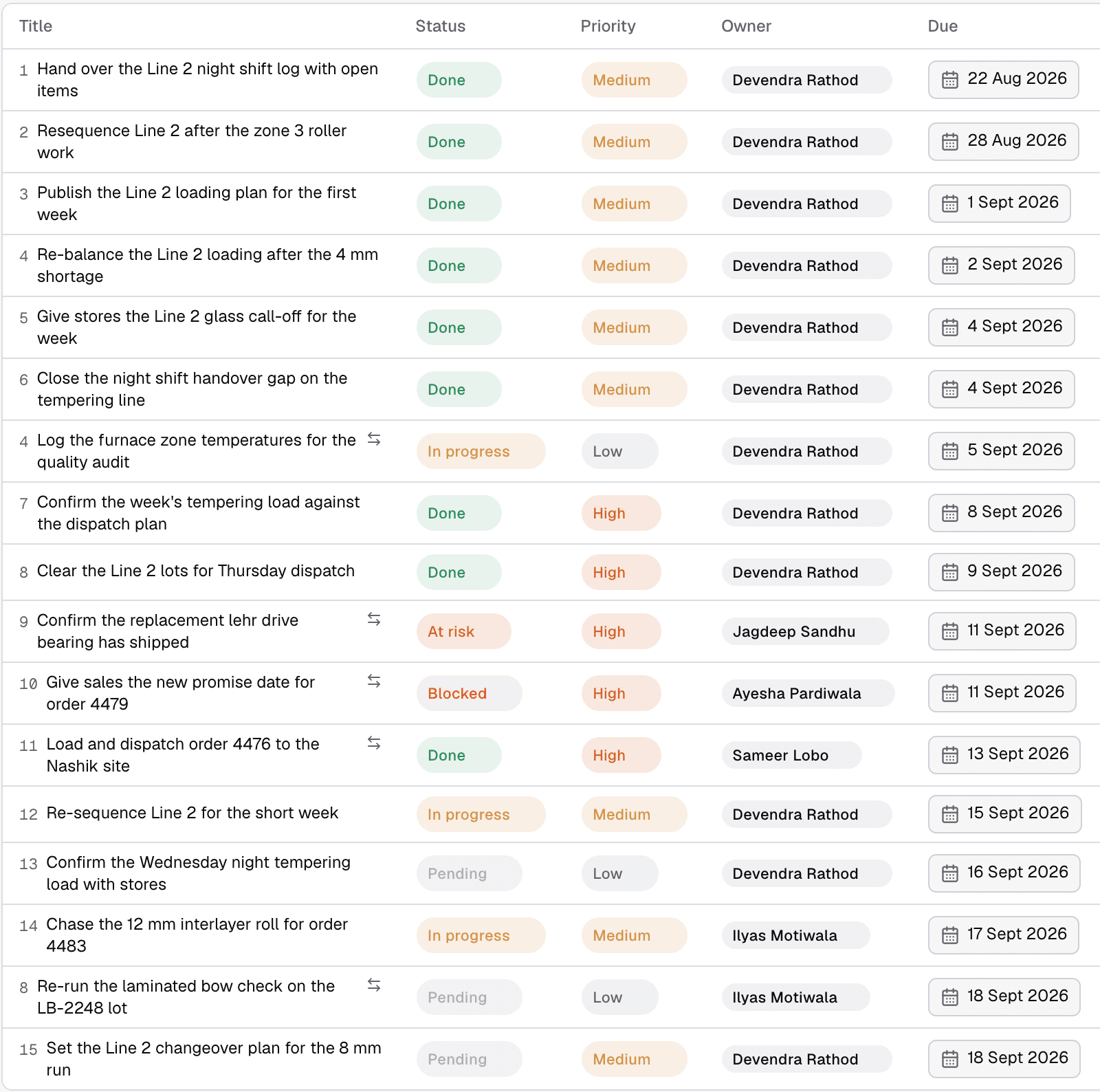
Morsa’s work board for one plant. Northline Glass, a demo plant.
What changed at two plants. At a 120-person glass plant, onboarded in two days, on-time completion of operational commitments rose from about 30% to about 75% in the first four weeks, across about 900 commitments in the first month. Plant Head Sunil K Verma: “I used to spend the first hour of every morning reconstructing yesterday. Now the chasing happens in the WhatsApp groups my supervisors already use, whether or not I remember.” The full account is in how a glass plant took on-time completion from 30% to 75% in four weeks. At JRG Automotive, running live, Morsa identified 5 of 8 production-stopping material shortages early enough to act and saved the plant $2 million. One night shift shows the mechanism: an 8,000-part target, 4,131 units scheduled, 4,035 dispatched. Morsa connected the 96-piece shortage to the target, told dispatch to arrange the parts, told production the target was blocked by supply, and opened a high-priority dependency, in under a minute.
Who it is built for. Morsa is built in the United States for mid-market and enterprise North American discrete manufacturers with an ERP or MRP already in place: machinery, automotive components, plastics and molding, metal fabrication, electronics, building products, aerospace and defense components. MES, QMS, CMMS, and WMS are bonuses, not requirements. Deployment is cloud, private cloud, or fully on-premise, including the AI models and databases, in four steps: Connect, Configure, Shadow, Live. Pilots start on one line or one workflow.
Who it is not for. Plants that do not yet have a system of record; buy the ERP first. Plants looking for a dashboard; Morsa works inside the channels people already use. Anyone who wants an AI that changes anything it likes; consequential actions follow the plant’s approval rules.
For what an AI that operates the factory does step by step, with the loop and the approval boundaries, read AI copilot for manufacturing. To see it on your plant’s data, book a demo.
Glossary
Term | Meaning |
|---|---|
APS | Advanced planning and scheduling. Sequences jobs across machines, people, and tooling with real constraints. |
BOM | Bill of materials. The list of parts and quantities needed to make one unit. The engineering BOM (eBOM) is how it is designed; the manufacturing BOM (mBOM) is how it is built. |
CMMS | Computerized maintenance management system. Maintenance work orders, preventive schedules, spares. |
EAM | Enterprise asset management. CMMS plus the whole asset lifecycle from purchase to retirement. |
ERP | Enterprise resource planning. The system of record for orders, inventory, BOMs, purchasing, and money. |
Historian | The time-series database of machine and sensor data. |
ISA-95 | The standard (also IEC 62264) that defines the levels of a manufacturing enterprise and the interface between ERP and the floor. |
MES | Manufacturing execution system. Dispatches production orders, collects what was made, tracks the floor in real time. |
MOM | Manufacturing operations management. ISA-95 Part 3 defines it as the “activities, functions and exchanges within level 3 of a manufacturing facility that coordinate the personnel, equipment, and material in manufacturing” (Siemens). MES is the most common MOM product. |
MRP | Material requirements planning. Turns orders and forecasts into what to buy and make, and when. |
OEE | Overall equipment effectiveness. Availability times performance times quality, usually computed from historian and MES data. |
PLC | Programmable logic controller. The computer inside the machine. |
PLM | Product lifecycle management. Designs, revisions, engineering changes, the eBOM. |
QMS | Quality management system. Inspection plans, nonconformances, corrective actions, audits. |
SCADA | Supervisory control and data acquisition. Operator screens, alarms, and setpoints over the PLCs. |
WMS | Warehouse management system. Receiving, put-away, picking, packing, shipping by location. |
Sources
International Society of Automation, ISA-95 Standard: Enterprise-Control System Integration..
Siemens, ISA-95 framework and layers (including the ISA-95 Part 3 definition of MOM).
SAP, What is a manufacturing execution system (MES)? Host blocks automated fetches; wording confirmed from an Internet Archive capture of May 2026.
Microsoft Learn, Manufacturing overview, Business Central, updated July 2026.
Microsoft Learn, Supply Planning, Business Central, updated September 2026.
SAP, How to Configure and Use MRP in SAP Business One, user guide, version 10.0, August 2024.
Microsoft Learn, Manage warehouse activities, Business Central, updated June 2026.
IBM, What is a CMMS (computerized maintenance management system)? Updated August 25, 2026.
PTC, What Is PLM? Product Lifecycle Management. Host blocks automated fetches; wording confirmed from an Internet Archive capture.
NIST Computer Security Resource Center, Supervisory Control and Data Acquisition (SCADA), from NIST SP 800-82r3.
NIST Computer Security Resource Center, Data Historian, from NIST SP 800-82r3.
US Food and Drug Administration, Quality Management System Regulation (QMSR), effective February 2, 2026.
NIST, NIST Announces Funding Opportunity for 14 MEP Centers to Advance Small and Medium-Sized U.S. Manufacturers, July 22, 2026.
National Association of Manufacturers, Facts About Manufacturing, citing US Census Bureau, Statistics of U.S. Businesses, updated May 6, 2025.
National Association of Manufacturers, Manufacturers’ Outlook Survey, Third Quarter 2026, September 14, 2026, 220 responses, fielded August 11 to 27, 2026.
Institute for Supply Management, Manufacturing PMI at 54.6%, August 2026, via PR Newswire, September 1, 2026.
Deloitte Insights, 2026 Manufacturing Industry Outlook, November 13, 2025, 600 executives.
Panorama Consulting Group, The 2026 ERP Report, 170 respondents, January 2025 to January 2026.
Panorama Consulting Group, Panorama Consulting Group Releases Latest Study of ERP Implementation Outcomes, March 4, 2026 (Chris Devault quote).
Gartner, Enterprise Resource Planning (ERP) topic page (70% by 2027 prediction). Host blocks automated fetches; wording confirmed from an Internet Archive capture of September 7, 2026.
International Society of Automation, ISA Receives MESA International Content, 2026.
IoT Analytics, Anand Taparia, MES vendors replace pen, paper, and spreadsheets, December 15, 2025.
Rockwell Automation, 93% of Manufacturers Have MES, But Only 23% Have Fully Integrated It, July 14, 2026, 1,560 respondents, 17 countries (vendor research).
Rockwell Automation, 90% of Manufacturers Say Digital Transformation Is Now Essential, 2026 State of Smart Manufacturing Report, May 19, 2026, 1,560 respondents (vendor research).
Capterra, Shubham Gupta, MRP software vs spreadsheets, April 20, 2026, 1,848 buyer interactions.
Modern Machine Shop, Eli Plaskett, Machine Monitoring Integrates With ERP to Reduce Errors, March 24, 2025 (Jessica Covington).
NIST Manufacturing Extension Partnership, Gutchess Lumber Finds Success with New ERP System Implementation, January 13, 2026 (Justin St. John).
Changelog
20 September 2026: replaced NAM’s second-quarter figures with the third-quarter survey published 14 September 2026 (80.8% raw material costs, 62.4% trade uncertainties, 44.6% supply chain challenges, 84.8% among medium-sized manufacturers, 61.0% placing significant or moderate emphasis on digital transformation).
20 September 2026: added Rockwell’s July 2026 integration figures, IoT Analytics’ MES adoption and market figures, ISM’s August 2026 Supplier Deliveries reading, Capterra’s MRP buyer figures, Gartner’s 70% prediction, Rockwell’s 43% data-use figure, and the Gutchess Lumber ERP case.
20 September 2026: added named quotations from Chris Devault (Panorama), Jessica Covington (Machine Specialties Inc.), Justin St. John (Gutchess Lumber), Anil Kohli and Sunil K Verma (J4S).
20 September 2026: corrected the NIST SCADA definition to its full wording (“over long distances”), the SAP Business One MRP quotation (“net-parent-demands”), the CMMS-versus-EAM quotation (now begins at the source sentence), the FDA link (the old URL now redirects), and the MOM definition in the glossary (ISA-95 Part 3 via Siemens); swapped the unverifiable SAP ERP definition for IBM’s; labeled the SAP MES and PTC pages as bot-blocked with archive confirmation; replaced numbered citations with inline links.
20 September 2026: removed the unsupported claims that plants on SAP schedule in Excel and that SAP, Oracle and Microsoft are the largest vendors “by market presence”; softened the cost line to “no public benchmark with a stated sample was found.”
20 September 2026: rephrased every section heading as a buyer’s question, added anchors to the table of contents, added the changelog and dateModified.

