Production planning software decides what a plant will make, in what order, on which machines, and with which materials, over a horizon from the next shift to the next quarter. It comes in three forms: the planning module inside an ERP, a standalone advanced planning and scheduling (APS) tool, and the spreadsheet most plants actually run on. Most plants are still on the third: IoT Analytics estimates that 54% of plants globally managed manufacturing operations with pen, paper or spreadsheets in 2024. The right tool depends on how many work centers you have, how often the plan changes, and who has to keep it alive after the person who built it moves on.
In this guide
What is production planning software?
What is the difference between production planning and production scheduling?
How does production planning work in a manufacturing plant?
What are the types of production planning software?
Can you do production planning in Excel?
Which production planning software is best? 14 tools compared
What features should production planning software have?
How can AI optimize production scheduling?
How often does the plan change, and what does it cost?
What does production planning software not do when the plan changes?
Where does Morsa fit in production planning?
How do you choose production planning software for your plant?
FAQ, Sources, Changelog, Related pages
What is production planning software?
Production planning software is any tool that turns demand (orders and forecasts) into a feasible plan of what to build, when, and with what. The strict definition comes from ASCM, the body behind the APICS Dictionary, which describes manufacturing planning and control as “a closed-loop information system that includes the planning functions of production planning (sales and operations planning), master production scheduling, material requirements planning, and capacity requirements planning.” The execution side of that loop includes “input-output control, detailed scheduling, dispatching, anticipated delay reports (department and supplier), and supplier scheduling.” Closed-loop has a precise meaning: “capacity constraints are considered when planning and controlling manufacturing” (ASCM, CPIM Learning System excerpt).
In plain words: planning software answers “what should we make and when,” scheduling software answers “on which machine, in what order, starting at what time,” and both are only useful if something feeds back what actually happened.
For the scheduling end, Gartner’s category is called detailed manufacturing scheduling. Its definition, updated March 2026, sets the bar most vendor pages avoid: solutions that “plan and organize production activities at a detailed level,” taking “material, machine capacity, labor and packaging” into account, for activity “ranging from seconds up to weeks out” (Gartner Peer Insights, read 12 September 2026; the host now blocks automated re-checks).
What is the difference between production planning and production scheduling?
Planning sets the targets and scheduling sequences the work to hit them. They run on different horizons, answer different questions, and are usually owned by different people.
Production planning | Production scheduling | |
|---|---|---|
Question it answers | What will we make, how much, and roughly when? | Which job runs on which machine, in what order, starting when? |
Horizon | Weeks to months (S&OP: quarters) | Seconds to weeks (Gartner’s range) |
Main inputs | Orders, forecast, inventory, bill of materials (BOM), lead times | Routings, work center capacity, tooling, labor, material on hand |
Output | Master production schedule (MPS) and material plan (MRP) | A dispatch list per work center per shift |
Typical owner | Planner, materials manager, S&OP lead | Scheduler, production manager, shift supervisor |
Where the tool lives | ERP planning module or S&OP tool | APS, ERP scheduling module, visual scheduler, or a spreadsheet |
Changes | Weekly or per planning run | Several times a day |
Siemens puts it more bluntly: “Planning is about strategy,” and “Scheduling is about tactics” (Siemens). The distinction matters at the shop level too. Dustin Sanks, president and owner of Sanks Machining, a job shop in Staunton, Illinois, told Modern Machine Shop that for a high-mix shop the repeated work is setup, not running: “We have to be mass production at setting up.” Before the shop changed its approach, setup knowledge “was very, very time consuming, and it was very, very tribal knowledge” (Modern Machine Shop, February 2026). A schedule that ignores setups and the people who know them is a plan for a different shop.
How does production planning work in a manufacturing plant?
Planning is a stack, and each layer takes the layer above as its input and gets more specific about time, machines, and people. The layers map onto the ISA-95 standard, which puts “business planning and logistics” at Level 4 and “manufacturing operations management” at Level 3 (ISA).
THE PLANNING STACK
From the quarterly plan to the shift list
Each layer takes the one above it as input and gets more specific about time, machines and people. MRP often assumes infinite capacity: the schedule below has not been tested against it.
01
LEVEL 4
Sales and operations planning
What will the plant make, by family, by month?
MONTHS TO QUARTERS
02
LEVEL 4
Master production schedule
Which end items, in what quantity, by week?
WEEKS
03
LEVEL 4
Material requirements planning
What to buy or make, and when, netted through the BOM?
WEEKS TO DAYS
04
LEVEL 4
Capacity check
Can the work centers actually do it?
WEEKS TO DAYS
05
LEVEL 3
Detailed scheduling
Which job, which machine, what order, what start time?
SHIFTS TO WEEKS
06
LEVEL 3
Dispatch and execution
What was actually completed, and by whom?
NOW
Which tool covers which layer: ERP planning module, standalone APS, MES, and the spreadsheet in practice. Sources: ASCM CPIM Learning System (APICS Dictionary); Microsoft Learn, Business Central planning docs (2025, 2026); ISA-95.
Sales and operations planning (S&OP). An executive-level process “where the supply, demand, and financial sides of the organization agree on a consensus plan.” The output is a production plan by product family, by month (ASCM).
Master production schedule (MPS). The build schedule for specific end items by week. In Business Central’s words, “MPS is the calculation of a master production schedule based on actual demand and the demand forecast” (Microsoft Learn).
Material requirements planning (MRP). Explodes the MPS through the bill of materials to work out what components to buy or make, and when. The planning run “takes all demand and supply data into account, nets the results, and creates suggestions for balancing supply to meet demand” (Microsoft Learn).
Capacity check. Whether the work centers can actually do it. This is where most ERPs stop short. Business Central’s own documentation states that its planning worksheet entries “assume infinite capacity” and that “work center and machine center capacity isn’t considered” (Microsoft Learn).
Detailed scheduling. Sequencing work orders on specific machines with finite capacity, tooling, and changeovers. This is the APS layer, or the scheduler’s spreadsheet.
Dispatch and execution. The shift list, the work order on the floor, and the feedback of what was actually completed. This is where the MES lives, and where the plan meets reality.
The gap that matters most is between steps 4 and 5. Standard MRP assumes every machine has infinite capacity. Your plant does not. Every plan that skips a finite capacity check is a promise nobody has tested.
What are the types of production planning software?
Five kinds of tool cover the stack, and most plants run two at once, usually an ERP for planning and something else for scheduling.
Examples
ERP planning module: Business Central, NetSuite, DELMIAWorks, Epicor Kinetic, Rootstock, Odoo, SAP Business One
MRP for small manufacturers: MRPeasy, Katana
Standalone APS: Siemens Opcenter APS, PlanetTogether, Asprova, Plataine
Visual scheduler: Visual Planning
Spreadsheet: Excel, Google Sheets
Horizon
ERP planning module: Weeks to months
MRP for small manufacturers: Days to weeks
Standalone APS: Shifts to months
Visual scheduler: Shifts to weeks
Spreadsheet: Whatever the planner types
Capacity model
ERP planning module: MRP nets material; capacity is often infinite by default
MRP for small manufacturers: Forward and backward scheduling on a Gantt; finite in some
Standalone APS: Finite capacity with optimization rules and what-if scenarios
Visual scheduler: Drag-and-drop workload leveling and what-if
Spreadsheet: None unless someone builds it
Who keeps it alive
ERP planning module: ERP admin plus a planner
MRP for small manufacturers: One planner
Standalone APS: A trained scheduler
Visual scheduler: Production manager
Spreadsheet: One person, one file
Price signal
ERP planning module: Included in the ERP tier (Business Central manufacturing needs Premium at $110 per user per month, paid yearly)
MRP for small manufacturers: $49 to $299 per month entry
Standalone APS: Quote only, across every APS checked
Visual scheduler: From $15 per user per month, annual billing
Spreadsheet: A Microsoft 365 seat
Breaks when
ERP planning module: The schedule must respect machine capacity, or changes several times a day
MRP for small manufacturers: You add sites, complex routings, or the add-ons stack up
Standalone APS: The one person who understood it leaves, or ERP master data is wrong
Visual scheduler: Constraints outgrow what a Gantt can show
Spreadsheet: Two people need it at once, or the plan changes after the planner goes home
Gartner’s list of mandatory features is the quickest way to tell whether a “scheduling” tool is actually a scheduler. As read on 12 September 2026, a detailed manufacturing scheduling solution must have all four (Gartner Peer Insights; the host now blocks automated re-checks, so treat the list as a 12 September reading):
[ ] A Gantt chart with interactive drag-and-drop of orders
[ ] Output at execution granularity (a list a supervisor can run a shift from)
[ ] Finite capacity modeling of resources, tools, dependencies and material flows
[ ] Data integration with ERP, MES and manufacturing operations management systems
Of the fourteen tools compared below, only three said “finite capacity” in their own words on the pages checked on 12 September 2026: Odoo (“finite capacity planning”), Asprova (“Finite Capacity Scheduling”) and Siemens (“finite or infinite capacity mode”, on its APS technology page). Epicor comes closest with “multiple constraint scheduling.” The other ten did not use the phrase on the pages linked, and MRPeasy’s pricing page, re-read on 19 September 2026, still describes its rough-cut capacity planning as “infinite capacity.” Ask.
Can you do production planning in Excel?
Yes, and most small plants do. A worksheet holds 1,048,576 rows by 16,384 columns, and a cell holds 32,767 characters, which is more than any plant will ever need for a schedule (Microsoft Support). Two surveys put numbers on the habit. IoT Analytics estimates that “54% of plants globally in 2024” managed manufacturing operations with pen, paper or spreadsheets, and that “just 8% of plants use a commercial MES today” (IoT Analytics, December 2025). Among people already shopping to leave, Capterra’s April 2026 analysis of 1,848 MRP software buyer interactions found “23% rely on spreadsheets for planning” and 25% “rely on manual methods instead of software tools”; the two reasons they switch are that “37% switch because planning inefficiency starts slowing execution” and “34% switch because spreadsheets no longer support the required functionality” (Capterra, Shubham Gupta, April 2026).
Practitioners defend it. In a r/manufacturing thread from 2023, one of the top replies to a 30-person box maker asking for scheduling software was: “For a small shop, you can use an Excel spreadsheet with macros.” The same commenter adds the warning that “scheduling software often requires expertise to understand what it’s doing. Managers get transferred or quit, and the knowledge is lost” (Reddit, r/manufacturing).
A production planning Excel template works as long as three things stay true: one person owns it, the plan changes less often than that person opens it, and nobody needs to know whether the plan was actually done. Excel’s legacy shared workbook allows 256 users at once, and Microsoft notes its button “has been hidden” in newer versions (Microsoft Support). The replacement, co-authoring, only works when the file lives in OneDrive or SharePoint Online, so a schedule on a shared drive or a desktop is back to one person at a time (Microsoft Support).
Signs the spreadsheet is done
[ ] Two people edit the schedule in the same shift and one version wins silently
[ ] Production capacity planning happens in the planner’s head, not in the file
[ ] A material shortage is known on the floor for hours before the sheet changes
[ ] The plan is rebuilt from scratch every Monday because last week’s drifted
[ ] Nobody can say which rows were completed without walking the floor
[ ] The planner is the only person who can open it without breaking a formula
If three or more are true, the spreadsheet is a symptom. But the fix is not always a scheduler. Read the next section before you buy one.
Which production planning software is best? 14 tools compared
There is no best one, only a best kind for your plant and then a shortlist inside that kind. Every tool below was checked against its own product and pricing pages on 12 September 2026, and the six tools with published prices were re-read on 19 September 2026. “Quote only” means the vendor publishes no price. “Not stated” means the vendor page does not say. For plants of 150 people and up, see enterprise manufacturing software for mid-market and enterprise manufacturers.
Microsoft Dynamics 365 Business Central
Kind: ERP planning module
Capacity model, in the vendor’s words: MPS and MRP; planning worksheet entries “assume infinite capacity”
Best fit: Small and mid-size plants already on Microsoft
Deployment: Cloud
Published price: Essentials $80, Premium $110 per user per month, paid yearly; manufacturing is Premium only
NetSuite Manufacturing
Kind: ERP planning module
Capacity model, in the vendor’s words: Three tiers: WIP and Routings adds “infinite capacity scheduling”; Advanced Manufacturing adds “finite capacity scheduling”
Best fit: Companies “of every size” on NetSuite
Deployment: Cloud
Published price: Quote only, annual subscription plus a one-time implementation fee
DELMIAWorks
Kind: ERP planning module
Capacity model, in the vendor’s words: Forecasting, MPS, MRP, APS and capable-to-promise “what if”; drag-and-drop
Best fit: Plants running the DELMIAWorks ERP; size not stated
Deployment: Not stated
Published price: Quote only
Rootstock
Kind: ERP planning module
Capacity model, in the vendor’s words: “Drag-and-drop scheduling and capacity planning”; checks material before scheduling
Best fit: Manufacturers on the Salesforce platform
Deployment: Cloud
Published price: Quote only
Epicor Kinetic
Kind: ERP planning module with APS
Capacity model, in the vendor’s words: “Multiple constraint scheduling,” visual drag-and-drop, capable-to-promise; the word finite does not appear on the Kinetic page
Best fit: Single-site to multi-site discrete manufacturers
Deployment: Cloud
Published price: Quote only; APS is an enhancement over the base scheduling engine
Odoo Manufacturing
Kind: ERP planning module (open source)
Capacity model, in the vendor’s words: “Finite capacity planning,” Gantt, master production schedule
Best fit: 1 to 250+ employees
Deployment: Online, Odoo.sh, or on-premise
Published price: One App Free $0; Standard $24.90 per user per month billed yearly or $31.10 billed monthly, discounted for the first 12 months (list $31.10 and $38.90); Custom $49.00 yearly or $61.10 monthly (list $61.00 and $76.20), required for on-premise
SAP Business One
Kind: ERP planning module
Capacity model, in the vendor’s words: Product page states nothing on production, MRP or scheduling outside two customer stories
Best fit: Small and midsize businesses in the SAP ecosystem
Deployment: Not stated
Published price: Quote only
MRPeasy
Kind: MRP for small manufacturers
Capacity model, in the vendor’s words: “forward scheduling or backward scheduling,” drag-and-drop rescheduling, MPS; rough-cut capacity planning is “infinite capacity”
Best fit: Small and growing manufacturers
Deployment: Cloud
Published price: $49 to $149 per user per month, then $79 per 10 users from the 11th
Katana
Kind: MRP for small manufacturers
Capacity model, in the vendor’s words: Auto-prioritizes manufacturing orders and allocates materials; drag-and-drop
Best fit: Growing small businesses, often e-commerce
Deployment: Cloud
Published price: Free (30 SKUs); Core “starts at $299/month”; the Manufacturing Management add-on that carries routings is $199 per month, Traceability $249, Warehouse Management $149; optional onboarding $2,000
Siemens Opcenter APS
Kind: Standalone APS
Capacity model, in the vendor’s words: “Finite or infinite capacity mode”; planning periods of “days, weeks, months or a combination”; detailed sequencing
Best fit: Not stated
Deployment: Not stated
Published price: Quote only
PlanetTogether
Kind: Standalone APS
Capacity model, in the vendor’s words: “Smart optimization” with weighted “optimization factors”
Best fit: “Complex manufacturing needs”; connects “to your ERP or Excel”
Deployment: Not stated
Published price: Quote only
Asprova
Kind: Standalone APS
Capacity model, in the vendor’s words: “Finite Capacity Scheduling”
Best fit: “3,300+ sites” worldwide; size not stated
Deployment: Not stated
Published price: Quote only
Plataine
Kind: Standalone AI scheduler
Capacity model, in the vendor’s words: “Advanced AI algorithms to maximize production throughput”
Best fit: Aerospace, composites, automotive suppliers
Deployment: Browser
Published price: Quote only
Visual Planning
Kind: Visual scheduler
Capacity model, in the vendor’s words: “Drag-and-drop workload leveling,” what-if, “AI Planning Assistant”
Best fit: Shop floors that want a scheduling layer over ERP and MES
Deployment: SaaS or “lifetime licence”
Published price: VP GO $15, VP PORTAL $40, VP DESK $55 per user per month, annual billing; lifetime licences from $290 plus 20% annual maintenance (pricing)
Microsoft Excel
Kind: Spreadsheet
Capacity model, in the vendor’s words: None; 1,048,576 rows by 16,384 columns
Best fit: One planner, one plant
Deployment: Desktop and cloud
Published price: Microsoft 365 seat
Three patterns in that table decide most shortlists:
If you already run an ERP with a manufacturing tier, start there. Business Central, Odoo, NetSuite and Epicor all ship MPS and MRP. The question is whether the scheduling on top respects capacity. NetSuite’s own product ladder shows the difference: infinite in the middle tier, finite only at the top (NetSuite). Read the vendor’s own docs, not the brochure.
If you are under about 50 people and one planner, MRPeasy, Katana, Odoo and Visual Planning are the only tools here with a public price under $300 a month. Watch the fine print: Katana’s routings live in a separate $199 a month add-on, Odoo’s price is a first-year rate that rises to $38.90 list, and Visual Planning’s prices are annual-billing rates.
If the schedule has to respect finite capacity across many work centers and changes daily, you are in APS territory, and none of the five APS vendors publish a price. Budget for a scheduler’s time, not only the license. The Reddit warning about lost knowledge is about this tier.
The broader plant-management suites that bundle planning with quality, maintenance and the floor record, with prices, are compared in manufacturing management software.
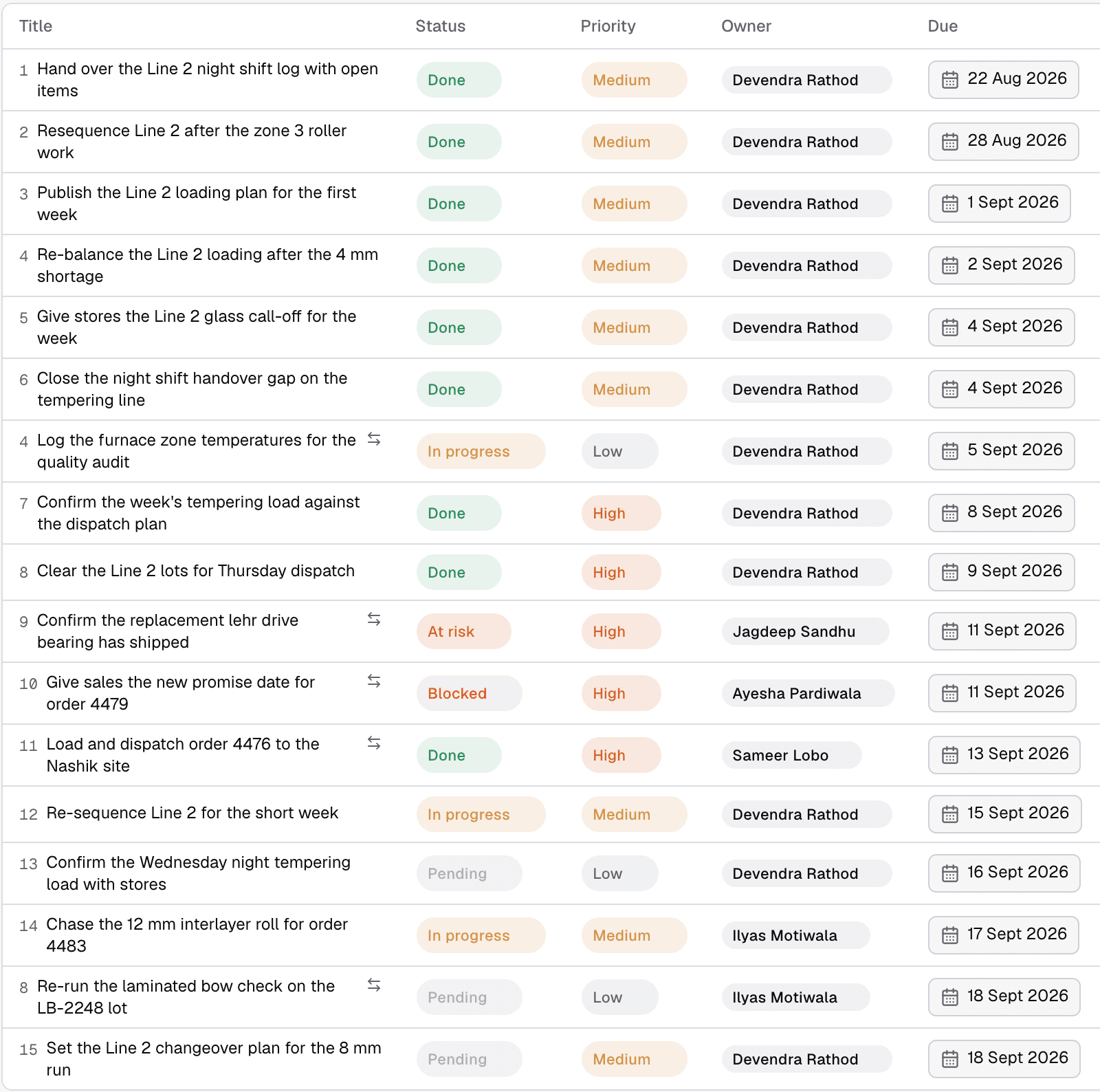
Morsa’s work board for one line. Northline Glass, a demo plant.
What features should production planning software have?
Beyond Gartner’s four mandatory features, seven things separate a planning tool from a drawing tool.
A capacity model you can name. Finite, infinite, or “we do not model capacity.” All three are acceptable answers. “Optimized” is not an answer.
Master data that matches the floor. Routings, run rates, setup times and BOMs that are actually maintained. An APS with stale routings produces a confident wrong schedule.
What-if scenarios. ASCM’s definition of APS says it “often generates and evaluates multiple scenarios. Management then selects one scenario to use as the ‘official plan’” (ASCM).
Two-way integration with the ERP and MES. The plan goes down. Completions, scrap and downtime come back up. One-way export is a report, not a loop. Integration is the industry’s top MES buying requirement, at 44% in Rockwell Automation’s July 2026 survey of 1,560 decision makers (Rockwell Automation, July 2026; vendor research with a stated sample).
A shift-level output. A supervisor should be able to run a shift from it without a planner in the room.
A way to record what actually happened. Not a “done” tick. Quantities, times, and who confirmed it.
Survivability. Documentation, a second trained person, and rules written down outside one person’s head. Ken Frankel, President of Three Sigma Manufacturing in Kent, Washington, told Modern Machine Shop why adoption follows effort: “a system that causes you to do more work to get the value out of it is one that generally is not going to have lots of people flocking toward it” (Modern Machine Shop, September 2026).
How can AI optimize production scheduling?
Two different things get called AI scheduling, and they should be kept apart.
The first is optimization. Solvers that search millions of sequences to minimize changeovers or lateness have been the core of APS for decades. ASCM’s definition of APS describes exactly that: software that “uses advanced mathematical algorithms or logic to perform optimization or simulation on finite capacity scheduling” (ASCM). Siemens Opcenter, PlanetTogether, Asprova and Plataine all sell versions of this. It is powerful, and it depends entirely on clean master data and a schedule that is still true when the solver finishes.
The second is newer: models that read unstructured signals (a message in a group chat, an email from a supplier, a change in the ERP) and work out what they mean for the plan. That is not scheduling. It is noticing that the schedule is about to be wrong, and doing something about it. Yung Fung, Managing Director and General Manager of Advanced Industrial Technology and Platforms at Ford, described the raw material at an MIT event in May 2026: “There’s a lot of signal in the factory. Too much data actually in a lot of cases,” and the problem-solving conversations that give it context are “not captured in a database, it’s not captured in a report” (Manufacturing Dive, May 2026).
The money is moving. Deloitte’s 2026 Manufacturing Industry Outlook reports that 80% of the 600 manufacturing executives in its 2025 survey “plan to invest 20% or more of their improvement budgets in smart manufacturing initiatives,” while “more than 81% of task hours in manufacturing are expected to remain human-driven” (Deloitte, November 2025). Rockwell Automation’s 2026 State of Smart Manufacturing report, 1,560 respondents, finds “one-third of operations (34%) are AI-augmented today” and that manufacturers “expect more than half of operations to be AI-supported by 2030” (Rockwell Automation, May 2026; vendor research). If someone offers you “the best AI production scheduling tool,” ask which of the two they mean. An optimizer needs your routings to be right. A signal reader needs access to where your people actually talk.
How often does the plan change, and what does it cost?
The plan changes most days in most plants, and the cost lands in lost output and lost dates rather than in the planning department. In the National Association of Manufacturers’ third-quarter 2026 survey of 220 manufacturers, fielded 11 to 27 August 2026, 80.8% cited increased raw material costs as a top business challenge, 62.4% cited trade uncertainties, and 44.6% cited supply chain challenges (NAM, September 2026). The Institute for Supply Management’s August 2026 report put the Supplier Deliveries Index at 59.3%, “slowing performance for the ninth month in a row,” with New Orders at 53.7% and Backlog of Orders at 51.8% (ISM via PR Newswire, September 2026). Orders are growing and suppliers are slower: every one of those reaches the schedule as a resequence.
Siemens’ True Cost of Downtime study, 181 interviews at large industrial firms, found that “an average large plant still loses 27 hours a month to unplanned downtime,” that plants “suffer an average of 25 downtime incidents a month per facility, down from 42 in 2019,” that recovery per incident rose from 49 minutes to 81, and that “Automotive manufacturers now lose $2.3 million for each unproductive hour” (Siemens, 2024; vendor research, Siemens owns Senseye). Twenty-five incidents a month is more than one a shift day, and each one is a schedule that is no longer true.
At job-shop scale the number is on-time delivery. Modern Machine Shop reported in September 2026 that Yeager Manufacturing, a Florida shop, saw its on-time delivery rate slip to 70% during a period with many expedited orders, and recover to 85 to 90% three months after adopting scheduling software that handles what the magazine calls schedule drift, “how reality on the shop floor differs from the scheduled plan” (Modern Machine Shop, September 2026). Most of what breaks a plan arrives from outside the plant, which is the subject of the guide to AI in the supply chain. How to measure OTD and OTIF, and how AI protects a ship date, is on AI for on-time delivery.
What does production planning software not do when the plan changes?
Every tool in the table above produces a plan, and none of them are in the room at 2 a.m. when the plan stops being true. How to measure whether the plan held, and how AI keeps it, is on AI for schedule attainment.
Here is what a plan change looks like in a real discrete plant, and what the planning stack does with it.
PLAN VERSUS REALITY
One night shift, one 96-piece gap
The plan is a promise. The record is what happened. Somebody has to connect the two before the truck leaves.
THE PLAN · ERP / APS / SHEET
Line: Line 2. Shift: Night. Shift target: 8,000 parts. Scheduled this shift: 4,131 pcs.
THE PLAN IS A PROMISE
THE RECORD · MES + HANDOVER
Dispatched: 4,035 pcs. Wayne T. · Shift B · 05:52: “Handover done. 4,035 out on Line 2, press was down 40 min after the die change. 2 carry-overs on the board.”
WHATSAPP GROUP · NIGHT SHIFT
Figures from a live Morsa deployment: 8,000-part target, 4,131 scheduled, 4,035 dispatched. Names, message text, the press note and the customer load are illustrative.
THE LOOP THAT CLOSES THE GAP
96 pieces short of the schedule
Connected to the work order it affects, and its owner, in under a minute.
1
Signal
4,035 dispatched against 4,131 scheduled, read from the MES and the handover message
2
Context
Which work order, which line, which customer order, who owns the re-plan
3
Consequence
The customer load is 96 short unless the day shift absorbs it
4
Decision
Within the approved rules, re-plan and notify. Outside them, ask a person
5
Execution
Routed to the owner with a date; the record and the group are updated
6
Verification
Closes on the dispatch count, not on a “done” message
A night shift has an 8,000-part target. The schedule says 4,131 pieces on the shift. The dispatch record says 4,035. The 96-piece gap is in the MES, or in a supervisor’s handover message, or in both. The ERP will find out at the next MRP run. The APS will find out when someone re-imports completions. The spreadsheet will find out on Monday. The customer will find out when the truck is short.
What the stack cannot do, by design:
A supplier said in a group chat that material lands Thursday, not Tuesday
ERP planning module: Does not read messages
Standalone APS: Does not read messages
Spreadsheet: Does not read messages
A machine went down and the supervisor told the maintenance group, not the planner
ERP planning module: Waits for the downtime entry
Standalone APS: Waits for a re-import
Spreadsheet: Waits for the planner
The shift completed 96 fewer pieces than scheduled
ERP planning module: Visible after the next planning run
Standalone APS: Visible after the next re-import
Spreadsheet: Visible if someone types it
Nobody owns the re-plan, so the group chat goes quiet
ERP planning module: No concept of an owner
Standalone APS: No concept of an owner
Spreadsheet: No concept of an owner
The re-plan was agreed on a call and never written down
ERP planning module: Plan and reality diverge silently
Standalone APS: Plan and reality diverge silently
Spreadsheet: Plan and reality diverge silently
The category is built to make a plan. The work of keeping the plan honest is done by people, in messages, and mostly by chasing. The gap is not small: in Rockwell’s July 2026 survey, 93% of manufacturers have an MES, but only 23% report full integration with ERP, PLM, quality and OT systems, so the completions that would correct the plan mostly do not flow back on their own (Rockwell Automation, July 2026).
Where does Morsa fit in production planning?
Morsa, the AI that operates the factory for you, sits on top of the planning stack rather than inside it. Factories make a plan, reality changes, Morsa handles the gap. It does not replace the ERP, the APS or the MES, and it does not make the schedule.
What it reads. The plan and the record from the ERP, MES, CMMS, QMS and WMS, and the channels where the plan actually gets changed, whatever they are: WhatsApp, Teams, email and SMS are examples, not the list. Integrations shown on morsa.ai include SAP Business One, Microsoft Dynamics 365 Business Central, Odoo, Zoho, QuickBooks, Excel and Google Sheets, and any system with an API, a database, a file export, a message stream or an email trail, machines, PLCs, SCADA systems and sensors included.
What it works out. For each signal: which part, work order, machine, customer and owner it touches (context), and what it affects downstream (consequence). The 96-piece shortage in the example above was connected to the work order it affected, and to its owner, in under a minute.
What it decides. Within rules the plant has approved. A shortage raised in a group becomes an expedite for purchasing and a re-planned line, routed to the person who owns it, with a due date. Outside the approved rules, it asks.
What it does. Executes across systems and people: updates the record, routes the work, chases before the date, escalates up the reporting line when the work goes quiet, and closes on proof rather than on a “done” message.
What the planner sees. A board where every open commitment has an owner, a date and a status, and a reliability view of which people and vendors hit their dates. The schedule stays in the scheduler. The follow-through stops being a memory exercise. Sunil K Verma, Plant Head at J4S: “I used to spend the first hour of every morning reconstructing yesterday. Now the chasing happens in the WhatsApp groups my supervisors already use, whether or not I remember.”
NIGHT SHIFT, LINE 2
What a plan change looks like before anyone has asked about it
8,000
parts, the night-shift target set by the manager
4,131
scheduled this shift, against 4,035 dispatched by the end of it, from the MES and the handover message
96
pieces short, connected to the work order it affects, and its owner, in under a minute
The ERP finds out at the next MRP run. The APS finds out at the next re-import. The spreadsheet finds out on Monday. Morsa, the AI that operates the factory for you, connects the gap to its owner while the shift is still running.
Figures from a live Morsa deployment
At JRG Automotive, running live, Morsa identified 5 of 8 production-stopping material shortages early enough to act, and saved the plant $2 million. At a 120-person glass plant, onboarded in two days, on-time completion of operational commitments rose from about 30% to about 75% in the first four weeks, across about 900 commitments in the first month. Production Head Anil Kohli: “Our people don’t have to learn any new software. People just message the way they always have. Morsa coordinates all the messages in the background.” The full account: how a glass plant took on-time completion from 30% to 75%.
Morsa deploys in the cloud, in a private cloud, or fully on-premise including the AI models and databases, in four steps: Connect, Configure, Shadow, Live. Pilots start on one line or one workflow. For what an AI that operates the factory does across the whole plant, see AI copilot for manufacturing. For where planning tools sit among the twelve system types a plant runs on, see manufacturing software: the 12 types.
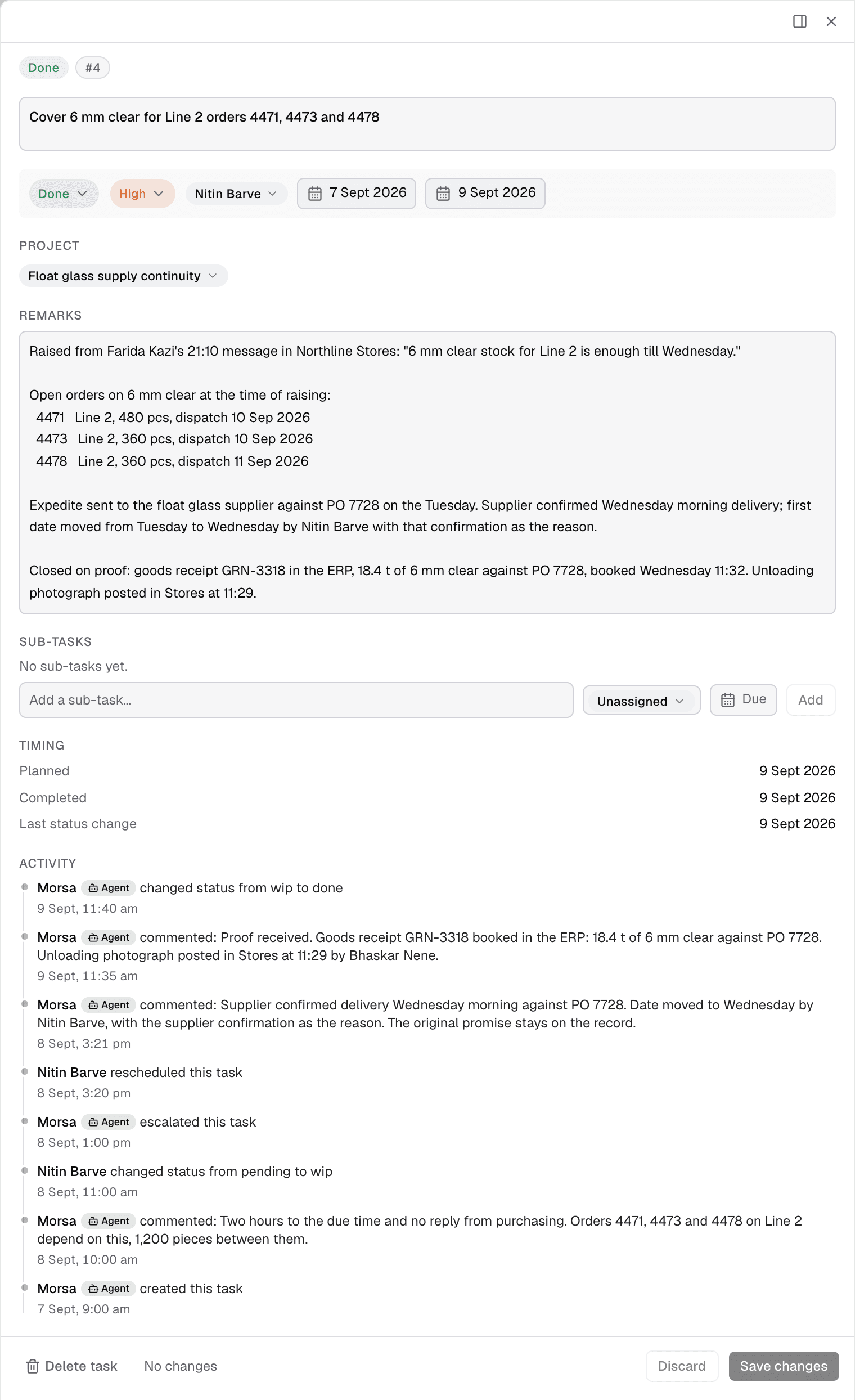
A commitment closed on proof in Morsa. Northline Glass, a demo plant.
How do you choose production planning software for your plant?
Choose by counting your constraints and your changes first, then buying for the layer you are fixing. Six steps:
Count two things. Work centers that actually constrain output, and how often the plan changes in a week. A handful of constraints and a plan that holds for a week can live in the ERP module or a well-built spreadsheet. Many constraints, or a plan that changes daily, needs finite capacity.
Name the horizon you are fixing. Months (S&OP), weeks (MPS and MRP), or shifts (detailed scheduling). Buy for that layer. Most disappointment comes from buying an APS to fix an S&OP problem, or an ERP to fix a shift problem.
Check what your ERP already does, in its documentation. Business Central, NetSuite, Odoo, Epicor and DELMIAWorks all ship planning. Find the sentence about capacity. If it says infinite, you know what the module will not do.
Score the shortlist on Gartner’s four mandatory features. Gantt with drag-and-drop, execution-level output, finite capacity modeling, ERP and MES integration. A tool missing any one of them is a planning aid, not a scheduler.
Pilot on one line for one month. Load real routings. Run the real schedule in parallel with the current one. Count the changes the tool caught versus the ones people caught in messages.
Plan for the person leaving. Write the rules down. Train a second person before go-live. This is the objection practitioners raise most, and it is the one vendors talk about least. The ERPs that carry the planning module, with honest pros and cons, are compared in manufacturing ERP software.
Sources
ASCM, CPIM Learning System excerpt quoting the APICS Dictionary (manufacturing planning and control, closed loop, APS, S&OP), 2020. https://learningsystem.ascm.org/wp-content/uploads/2019/11/CPIM_LS_2020_Excerpt-2.pdf
Gartner Peer Insights, Detailed Manufacturing Scheduling market definition and mandatory features, updated March 2026; read September 12, 2026. The host blocks automated re-checks and the page has no Internet Archive capture, so the list stands on that reading. https://www.gartner.com/reviews/market/detailed-manufacturing-scheduling
Microsoft Learn, Dynamics 365 Business Central, About planning functionality, updated June 2026. https://learn.microsoft.com/en-us/dynamics365/business-central/production-about-planning-functionality
Microsoft Learn, Dynamics 365 Business Central, Run MPS and MRP, updated August 2025. https://learn.microsoft.com/en-us/dynamics365/business-central/production-how-to-run-mps-and-mrp
ISA, ISA-95 standard. https://www.isa.org/standards-and-publications/isa-standards/isa-95-standard
IoT Analytics, Anand Taparia, “MES vendors replace pen, paper, and spreadsheets,” December 15, 2025. https://iot-analytics.com/mes-vendors-replace-pen-paper-spreadsheets/
Capterra, Shubham Gupta, “MRP software vs spreadsheets,” April 20, 2026, based on 1,848 buyer interactions from January 1, 2025 to January 1, 2026. https://www.capterra.com/resources/mrp-software-vs-spreadsheets/
National Association of Manufacturers, Manufacturers’ Outlook Survey, Q3 2026, 220 responses, fielded August 11 to 27, 2026, published September 14, 2026. https://nam.org/wp-content/uploads/2026/09/Q3_2026_Writeup_Final.pdf
Institute for Supply Management, Manufacturing PMI at 54.6%, August 2026, via PR Newswire, September 1, 2026. https://www.prnewswire.com/news-releases/manufacturing-pmi-at-54-6-august-2026-ism-manufacturing-pmi-report-302865127.html
Siemens (Senseye), The True Cost of Downtime 2024, 181 interviews, April 2019 to March 2023 (vendor research). https://assets.new.siemens.com/siemens/assets/api/uuid:1b43afb5-2d07-47f7-9eb7-893fe7d0bc59/TCOD-2024_original.pdf
Deloitte, 2026 Manufacturing Industry Outlook, November 13, 2025, 600 executives. https://www.deloitte.com/us/en/insights/industry/manufacturing-industrial-products/manufacturing-industry-outlook.html
Rockwell Automation, “90% of Manufacturers Say Digital Transformation Is Now Essential,” 2026 State of Smart Manufacturing Report, May 19, 2026, 1,560 respondents in 17 countries (vendor research). https://www.rockwellautomation.com/en-us/company/news/press-releases/90-of-Manufacturers-Say-Digital-Transformation-Is-Now-Essential-According-to-New-Global-Study.html
Rockwell Automation, “93% of Manufacturers Have MES, But Only 23% Have Fully Integrated It,” July 14, 2026, 1,560 respondents (vendor research). https://www.rockwellautomation.com/en-us/company/news/press-releases/93-of-Manufacturers-Have-MES-But-Only-23-Have-Fully-Integrated-It-New-Rockwell-Automation-Report-Finds.html
Modern Machine Shop, Evan Doran, “Charting the Course Through Schedule Drift,” September 8, 2026 (Ken Frankel quote; Yeager Manufacturing figures). https://www.mmsonline.com/articles/charting-the-course-through-schedule-drift
Modern Machine Shop, Julia Hider, “Multitasking Machines Scale Up Setup,” February 16, 2026 (Dustin Sanks quotes). https://www.mmsonline.com/articles/multitasking-machines-scale-up-setup
Manufacturing Dive, Cole Rosengren, “MIT manufacturing event: Ford, Amgen, GE, ArcelorMittal on data and automation,” May 22, 2026 (Yung Fung quotes). https://www.manufacturingdive.com/news/mit-manufacturing-data-automation-ford-amgen-ge-arcelormittal/820681/
Microsoft Support, Excel specifications and limits. https://support.microsoft.com/en-us/office/excel-specifications-and-limits-1672b34d-7043-467e-8e27-269d656771c3
Microsoft Support, Collaborate on Excel workbooks at the same time with co-authoring. https://support.microsoft.com/en-us/office/collaborate-on-excel-workbooks-at-the-same-time-with-co-authoring-7152aa8b-b791-414c-a3bb-3024e46fb104
Siemens, Advanced Planning and Scheduling (APS). https://www.siemens.com/en-us/technology/advanced-planning-scheduling-aps/
Siemens, Manufacturing planning vs production scheduling. https://resources.sw.siemens.com/en-US/game-manufacturing-planning-vs-production-scheduling/
NetSuite, “Solving Manufacturing Complexity with NetSuite Work Orders & Assemblies, WIPs & Routings and Advanced Manufacturing,” October 2021; host blocks automated fetches, wording confirmed from an Internet Archive capture of April 21, 2026. https://www.netsuite.com/portal/resource/articles/erp/solving-manufacturing-complexity-with-netsuite-work-orders-assemblies-wips-routings-and-advanced-manufacturing.shtml
Reddit, r/manufacturing, “Do you have solution recommendations for Production schedule software and Better inventory mgmt?”, August 30, 2023; lines re-read through the Reddit API on September 19, 2026. https://www.reddit.com/r/manufacturing/comments/165hupl/do_you_have_solution_recommendations_for/
Vendor product and pricing pages, all read September 12, 2026, with the six published price lists (Business Central, Odoo, MRPeasy, Katana, Visual Planning, Acumatica model) re-read September 19, 2026: Microsoft Dynamics 365 Business Central (learn.microsoft.com and microsoft.com pricing), NetSuite (netsuite.com/portal/industries/manufacturing.shtml), DELMIAWorks (solidworks.com), Rootstock (rootstock.com), Epicor Kinetic (epicor.com; host blocks re-checks, Internet Archive capture of August 23, 2026), Odoo (odoo.com/app/manufacturing and odoo.com/pricing), SAP Business One (sap.com), MRPeasy (mrpeasy.com and mrpeasy.com/pricing), Katana (katanamrp.com and pricing), Siemens APS (siemens.com/en-us/technology/advanced-planning-scheduling-aps), PlanetTogether (planettogether.com), Asprova (asprova.com), Plataine (plataine.com), Visual Planning (visual-planning.com use case and plans-pricing pages).
Changelog
24 September 2026: Odoo prices re-read. Billed yearly, Standard is $24.90 and Custom $49.00 per user per month for the first 12 months (lists $31.10 and $61.00); billed monthly they are $31.10 and $61.10 (lists $38.90 and $76.20). Every current Odoo price on this page now names its billing term.
20 September 2026: corrected Odoo’s prices (Standard $31.10 first year, $38.90 list; Custom $61.00, $76.20 list) in the table, the shortlist patterns and the FAQ, and corrected Katana’s add-on: routings live in the $199 Manufacturing Management add-on, with Traceability $249, Warehouse Management $149 and optional $2,000 onboarding now listed.
20 September 2026: added a section, “How often does the plan change, and what does it cost?”, with NAM’s third-quarter 2026 survey (published 14 September 2026), ISM’s August 2026 indexes, Siemens’ downtime figures and a schedule-drift case from Modern Machine Shop.
20 September 2026: added Capterra’s switching reasons (37% planning inefficiency, 34% spreadsheet limits), IoT Analytics’ 54% and 8% adoption figures, Rockwell’s 93% and 23% integration figures and 34% AI-augmented figure, and Deloitte’s 81% human task hours.
20 September 2026: added named quotations from Dustin Sanks (Sanks Machining), Ken Frankel (Three Sigma Manufacturing), Yung Fung (Ford), Anil Kohli and Sunil K Verma (J4S).
20 September 2026: labeled the Gartner Peer Insights definition and four-feature list as read on 12 September 2026 with a host that now blocks re-checks; dropped the claim that Google’s AI Overview cited the Reddit thread; changed “the top-scoring reply” to “one of the top replies”; noted Visual Planning’s lifetime licences carry 20% annual maintenance; noted that the word finite does not appear on Epicor’s Kinetic page.
20 September 2026: rephrased every section heading as a buyer’s question, added anchors to the table of contents, added the changelog and dateModified.

